Issue reproduction is a critical step in communicating and confirming how to trigger the undesired behavior that was reported in the ticket.
Provide as much of the environment information as possible and any special configuration considerations (using Docker, multisite with subdomains, etc). Delete any sections from the report that are not applicable.
Example reproduction reports:
Generating Reports with the Test Reports Plugin
Instead of filling out the template manually, you can use the Test Reports plugin to auto-generate reproduction reports pre-filled with your environment details.
What it does
The plugin automatically captures your WordPress version, PHP version, active theme, plugins, browser, and OS — eliminating manual data entry for the Environment section.
Where to get it
Install Test Reports directly from wordpress.org/plugins/test-reports.
How to use it
- Install and activate the plugin on your test site.
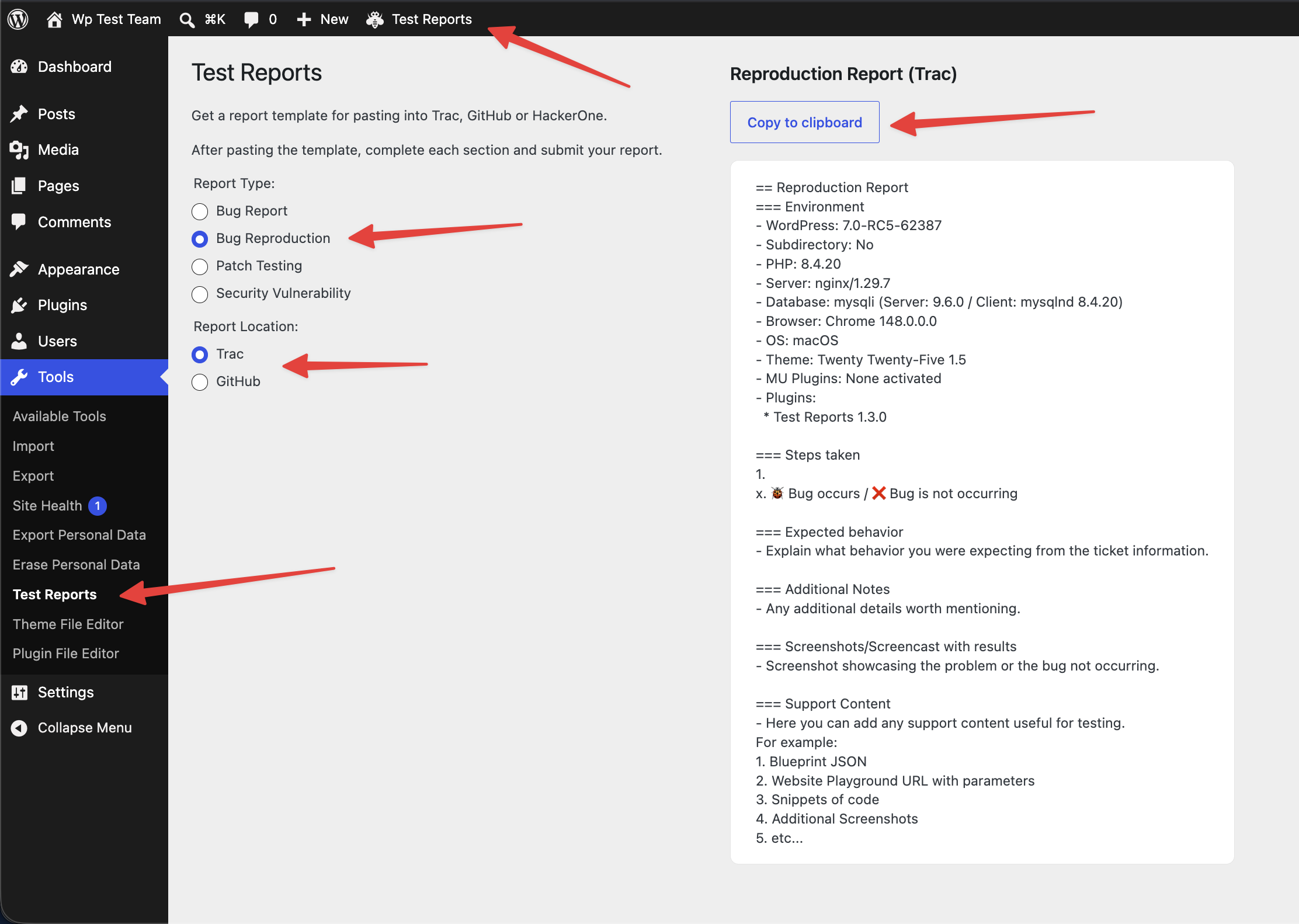
- Navigate to Tools > Test Reports or click Test Reports in the admin toolbar.
- Select the Report Type (Bug Reproduction) and Report Location (Trac or GitHub) — the plugin will format the output accordingly.
- Fill in only the fields that require manual input: Steps taken, Expected behavior, and Additional Notes.
Plugin Screenshot
Tips
- For GitHub issues, the plugin outputs Markdown-formatted reports ready to paste directly.
- For Trac tickets, the plugin outputs Wiki-formatted reports compatible with Trac’s syntax.
- Always review the auto-filled environment details before posting to confirm accuracy.
Reproduction Report Template
Trac template
Use this version when posting a reproduction report to a Trac ticket:
== Reproduction Report

=== Environment
- WordPress: X.Y-Z
- PHP: X.Y.Z
- Server: Server Name X.Y.Z
- Database: Database Name X.Y.Z
- Browser: Browser Name X.Y.Z
- OS: Operating System X.Y.Z
- Theme: Theme Name X.Y.Z
- MU Plugins:
  - MU Plugin 1 X.Y.Z
- Plugins:
  - Plugin 1 X.Y.Z
  - Plugin 2 X.Y.Z

=== Steps taken
1. Step one
2. Step two
x. 🐞 Bug occurs: Describe what happened / ❌ Bug is not occurring

=== Expected behavior
- Explain what behaviour you were expecting from the ticket information.

=== Additional Notes
- Any additional details worth mentioning.

=== Screenshots/Screencast with results
- Screenshot showcasing the problem or the bug not occurring.

=== Support Content
- Here you can add any support content useful for testing.
  1. Blueprint JSON
  2. Website Playground URL with parameters
  3. Snippets of code
  4. Additional Screenshots
  5. etc...
GitHub template
Use this version when posting a reproduction report to a GitHub issue:
## Reproduction Report

### Environment

- WordPress: X.Y-Z
- PHP: X.Y.Z
- Server: Server Name X.Y.Z
- Database: Database Name X.Y.Z
- Browser: Browser Name X.Y.Z
- OS: Operating System X.Y.Z
- Theme: Theme Name X.Y.Z
- MU Plugins:
  - MU Plugin 1 X.Y.Z
- Plugins:
  - Plugin 1 X.Y.Z
  - Plugin 2 X.Y.Z

### Steps taken

1. Step one
2. Step two
x. 🐞 Bug occurs: Describe what happened / ❌ Bug is not occurring

### Expected behavior

- Explain what behaviour you were expecting from the ticket information.

### Additional Notes

- Any additional details worth mentioning.

### Screenshots/Screencast with results

- Screenshot showcasing the problem or the bug not occurring.

### Support Content

- Here you can add any support content useful for testing.
  1. Blueprint JSON
  2. Website Playground URL with parameters
  3. Snippets of code
  4. Additional Screenshots
  5. etc...